|
|
|
||||||
|
||||||||
|
||||||||







 |
||||||
|
||||||
|
TbcISAPIFilter component brings visual development to your Delphi and C++ Builder environment by letting you point and click to handle events only. Drop the component on a data module and handle the events you wish. Visually set the filter priority. For a quick example, check out the accompanying IIS Authentication Filter sample DLL source code. We have tested TbcISAPIFilter with Delphi 4, 5, 6, 7, 2006, 2007, 2009, 2010, XE and C++ Builder 4, 5, 6, 2006, 2009, 2010, XE. The Component comes as source code in single .pas file (for Delphi 2006, 2007 design time packages are also included for your convenience). There is a sample project source code which does custom authentication by looking up a database of valid users. There is also a more complicated example of handling SEND_RAW_DATA notifications. There is also a help file for the ISAPIFilter component. Features: Drag Drop on your DataModule and: Users are given a chance to do some initialization in event handlers: OnBeforeProcessGetFilterVersion OnAfterProcessGetFilterVersion or it is also possible to do initialization in DllMain, or Initialization section of a Delphi Unit. GetFilterVersion tells IIS which and what kind of notifications it should receive. GetFilterVersion knows which notifications it should register for by looking at the event handler functions assigned for an event that represents a notification. GetFilterVersion makes sure that request to receive the related notification message is sent to the IIS. Users of this component can assign event handlers at runtime in the OnBeforeProcessGetFilterVersion event handler. After OnBeforeProcessGetFilterVersion, it is too late to assign event handlers for notification messages. But users at any time can still assign OnException, OnDestroy. If the need arises to handle a notification which was not known when this component was designed, users can supply the OnAfterProcessGetFilterVersion handler and they will be given a last chance to modify the HTTP_FILTER_VERSION structure. Such notifications will be handled by the OnUnknownNotification handler. Exported HttpFilterProc will call the TbcISAPIFilter.HttpFilterProc for actual handling of the notifications. This function will call the proper user assigned event handler. Possible event handlers that are called from HttpFilterProc are: If an event handler function is assigned for an event, GetFilterVersion makes sure that request to receive the related notification message is sent to the IIS. Other useful event handlers: OnDestroy - called when the Filter Object is about to be freed from memory. OnException - called when there is an error. There are also following event handlers that are called from GetFilterVersion: IIS Event Notification OrderOnReadRawData Provides Delphi event to handle SF_NOTIFY_READ_RAW_DATA IIS notification. When a client sends a request, one or more SF_NOTIFY_READ_RAW_DATA notifications occur. Data is read until the client has sent all of the HTTP headers associated with the request. OnPreprocHeaders A single SF_NOTIFY_PREPROC_HEADERS notification occurs for each request. This notification indicates that the server has completed preprocessing of the headers associated with the request, but has not yet begun to process the information in the headers. OnUrlMap An SF_NOTIFY_URL_MAP notification occurs whenever the server is converting a URL to a physical path. This notification occurs at least once after the preprocessed header's notification for the request, and might occur many additional times during processing of the associated request. OnAuthentication An SF_NOTIFY_AUTHENTICATION notification occurs just before IIS attempts to authenticate the client. This notification occurs for every new connection (including anonymous requests), and every time the client sends enabled user credentials for the target URL, in the form of an authorization header, to be authorized by the server. The AuthPersistence property setting in the metabase directly affects this filter. Note that not all requests are guaranteed to trigger an authentication notification. This notification only fires for anonymous requests and requests with an authorization header that specifies Basic authentication. OnAuthComplete (IIS 5.0 and later) SF_NOTIFY_AUTH_COMPLETE notification, new to IIS 5.0, offers functionality similar to that of SF_NOTIFY_PREPROC_HEADERS. Specifically, it allows viewing and modification of the method, URL, version, or headers sent from the client. The key difference between this notification and preprocessed headers is that this notification occurs after the client's identity has been negotiated with the client. Because of the notification's timing, the AUTH_USER server variable can be used to reliably obtain the identity of the user. Also, functionality is provided to retrieve a copy of the token that IIS impersonates when processing the request. After OnAuthComplete exits, as mentioned in OnReadRawData section, if the client has more data to send, one or more SF_NOTIFY_READ_RAW_DATA notifications occur at this point. Each one indicates that IIS has read another chunk whose size equals either the value of the UploadReadAheadSize metabase property (usually 48 KB), or the remaining number of bytes available (if the chunk is the last one). Because many factors can force IIS to adopt a different chunking scheme, additional raw read events are not always completely predictable. Therefore, ISAPI filters should not rely on the exact behavior described above. At this point, IIS begins processing the substance of the request. This can be done by an ISAPI extension, a CGI application, a script engine such as ASP or PERL, or by IIS itself for static files. OnSendResponse This event occurs after the request is processed and before headers are sent back to the client. This is triggered by SF_NOTIFY_SEND_RESPONSE notification from IIS. OnSendRawData As the request handler returns data to the client, one or more SF_NOTIFY_SEND_RAW_DATA notifications occur. OnEndOfRequest At the end of each request, the SF_NOTIFY_END_OF_REQUEST notification occurs. OnLog After the HTTP request is complete and just before IIS writes the request to its log, the SF_NOTIFY_LOG notification occurs. OnEndOfNetSession When the connection between the client and the server is closed, the SF_NOTIFY_END_OF_NET_SESSION notification occurs. If a Keep-Alive connection has been negotiated, it is possible for many HTTP requests to occur before this notification. ISAPI Filter Component comes as Delphi source code. There is a sample IIS Authentication Filter project that uses this component. There is also a help file. Version 2.0 includes fix for the multi-threading bug which appeared under heavy load on dual CPU. It also includes support for new IIS 5.0 notifications. Help file is available for separate download for quick review[139KB] TbcISAPIFilter Component for Delphi is FREEYou can download TbcISAPIFilter immediately from sourceforge (Apache 2 license): http://sourceforge.net/projects/bcisapifilter/
For technical questions please contact support@bestcode.com
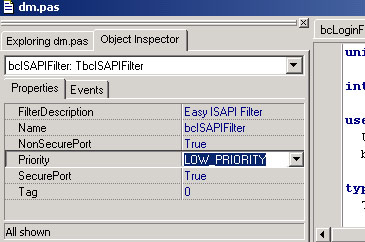
Tips and Screen ShotsDid you know? Did you know? Screen shots: Here is TbcISAPIFilter Component in action:
Here are the events you can handle:
Here are the properties:
More screen shots available in Delphi Installation Page. |
||||||


 ISAPI Filters and Extensions are used to
extend the Microsoft Internet Information Server (IIS) through the ISAPI programming API. An ISAPI Extension can be used to handle a web request in a custom way, however, unlike an
extension, an ISAPI Filter can be used to intercept all or some HTTP request at different levels based on need and change the outcome of the whole process in very efficient ways. ISAPI is a low level API
usually mastered by C or C++ (Commonly MFC). However, for those of us who love the ease of drag drop visual development and the powerful yet easy VCL, there is Delphi! TbcISAPIFilter component from
bestcode.com is designed to help Delphi developers continue to use their beloved Delphi (or C++ Builder) IDE for ISAPI Filter development and utilize their existing knowledge on familiar libraries.
ISAPI Filters and Extensions are used to
extend the Microsoft Internet Information Server (IIS) through the ISAPI programming API. An ISAPI Extension can be used to handle a web request in a custom way, however, unlike an
extension, an ISAPI Filter can be used to intercept all or some HTTP request at different levels based on need and change the outcome of the whole process in very efficient ways. ISAPI is a low level API
usually mastered by C or C++ (Commonly MFC). However, for those of us who love the ease of drag drop visual development and the powerful yet easy VCL, there is Delphi! TbcISAPIFilter component from
bestcode.com is designed to help Delphi developers continue to use their beloved Delphi (or C++ Builder) IDE for ISAPI Filter development and utilize their existing knowledge on familiar libraries.