|
|
|
||||||
|
||||||||
|
||||||||







|
||||||||||
 |
||||||||||
|
||||||||||
ISAPI Authentication Filter
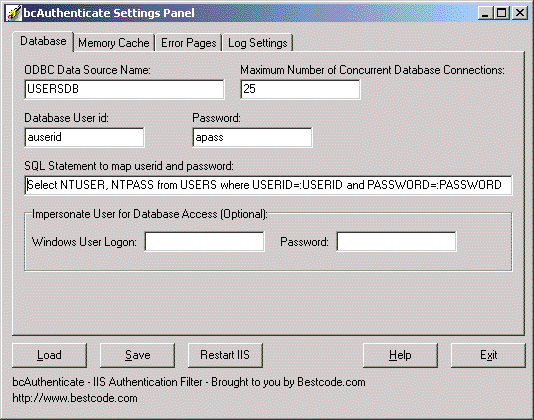
bcAuthenticate has an Administration GUI where you can set various options. bcAuthenticate comes as a Windows Installer. Once installed, it expands into the admin GUI, Filter DLL and the help system. Evaluation version is available for download. (Evaluation version DLL runs for 2 hours and then stops working until next server re-start).
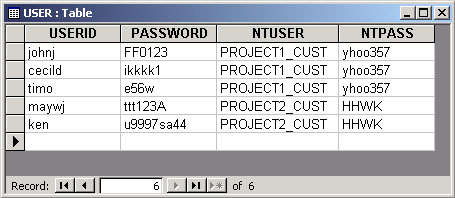
IIS User Authentication Using a SQL DatabaseYou can read bcAuthenticate documentation here. A typical database table for user role assignments is as below:
In this case, when the user �johnj� logs in using password �FF0123�, he will have the permissions of the NT Account PROJECT1_CUST. Outside users will never see your NT user name and passwords. You will be able to change them at will without effecting any of the users. You can cancel a user�s access permission as you wish without effecting others. For example, your USER table could contain a column named ENABLED. When false, you would not authenticate the user. You can programmatically add/remove users from a USER table like this. This makes it easy to protect all resources (including images and other files) in the protected portions of a website very easy. For example, upon credit card payment, your ASP code can add a user to this table, and he/she can have access to the paid content right away. Having this filter installed removes many technical problems that could otherwise limit your imagination towards an elegant solution. bcAuthenticate comes with an Admin GUI where you can visually setup your authentication options. These are discussed in detail in the product help documentation.
Purchasing bcAuthenticate IIS Authentication FilterYou can pay with credit card and download bcAuthenticate immediately from our online store for only $39.95.
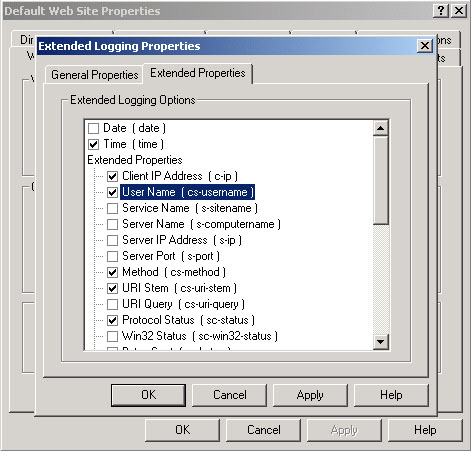
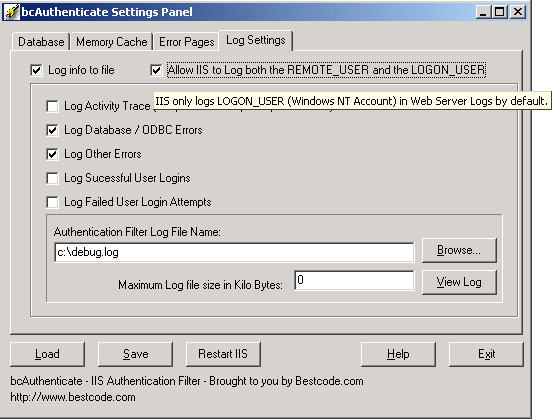
What is new in bcAuthenticate? In the latest version, bcAuthenticate adds the ability to include the original username and the mapped username in the IIS log files. This is useful for audit purposes. Normally, if you have selected to log the username in IIS management console, only the Windows NT account name (username looked up from the database) would get logged by IIS. Now, bcAuthenticate gives you the option to extend IIS logging mechanism by logging both the original name and the mapped name as below example: #Fields: time c-ip cs-username cs-method cs-uri-stem sc-status To enable logging the username, you need to use IIS management console:
To facilitate this new option, bcAuthenticate settings panel provides a checkbox where you can turn this additional logging facility on to log both the REMOTE_USER and the LOGON_USER:
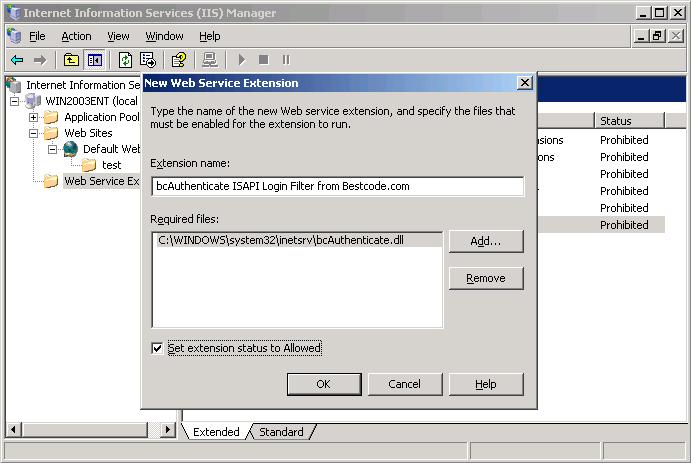
Windows 2003 Installation/Security Settings HighlightsWindows 2003 attempts to enhance Windows security and is quite different than Window 2000. Differences are as follows: 1. You need to pick your ISAPI filter DLL and introduce it to IIS as �allowed to run�. Your directory that contains the filter DLL must have execute permissions for the IIS user account. Easiest to give execute permissions to Everyone for that directory.
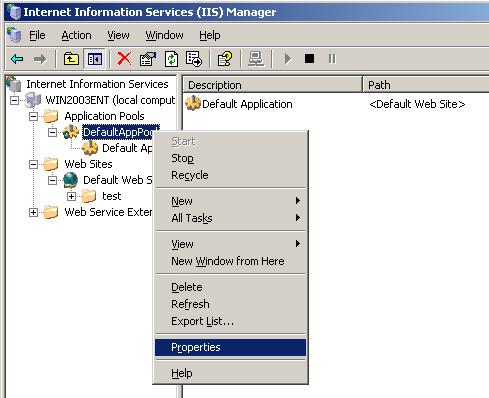
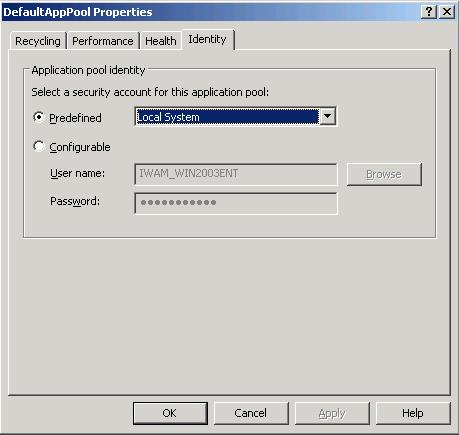
2. You need to make sure that your Web Site uses an Application Pool that uses an Account that has proper access rights to the directories where your bcAuthenticate LOG file resides and your database is located. Simplest way to make sure permissions are allowed is to use �Local System� account.
Then you need to set the account in the Identity tab:
3. Then you can install the component. However, the DLL will be loaded only after you make an http request and then you can see the green status:
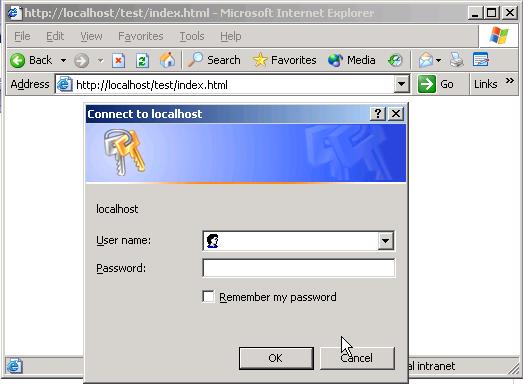
And when you try to access a protected page (you need to limit directory access permissions and tell IIS not to use Anonymous Acces), you can login as below:
Troubleshooting Common Problems1. Make sure that the DLL is placed in a directory which has �Execute� permissions for IIS. To get started, try with full control for Everyone for that folder. 2. Make sure that IIS has write permissions for the log folder (the directory that you pick for the bcAuthenticate log file). To get started, try with full control for Everyone for that folder. 3. Make sure your operating system / IIS is able to run a 32 bit DLL. This filter is a 32 bit DLL. 4. When you do not see filter status in IIS Admin Console, try to make an HTTP request that should involve the filter. Some IIS versions do not load the filter until it is needed. Software License for your review. Purchasing bcAuthenticate IIS Authentication FilterYou can pay with credit card and download bcAuthenticate immediately from our online store for only $39.95.
For technical questions please contact support@bestcode.com
|
||||||||||


 bcAuthenticate is a 32 bit ISAPI Authentication Filter for
the Internet Information Server (IIS) that enables an IIS website use a relational database to authenticate users by locating their userid/passwords using ODBC and mapping them to specified Windows Accounts.
bcAuthenticate is a 32 bit ISAPI Authentication Filter for
the Internet Information Server (IIS) that enables an IIS website use a relational database to authenticate users by locating their userid/passwords using ODBC and mapping them to specified Windows Accounts.